

Introduction
Rebuild your workstation from a commit.
Rivet records the explicit packages and the user-approved configuration that define a Linux or macOS environment, and writes them to storage you control — a Git remote, a mounted NAS, any of ~70 cloud providers via rclone, or a restic repository. It is not a disk imager and not a whole-home backup — it captures the handful of things that actually make a machine yours, and refuses to touch secrets.
Rivet is stable as of 1.0: init, snapshot, restore and doctor are
supported on Linux and macOS, the CLI surface is frozen under semantic
versioning, and releases carry Sigstore signatures and build provenance that
install.sh verifies. It makes a desktop rebuild repeatable, inspectable, and
considerably safer than copying your home folder. The gaps that remain are
listed in feature status — read them before you rely on it.
Install
Section titled “Install”curl -sSf https://rivet.fobiat.workers.dev/install | shOn macOS, use the Homebrew tap instead — Homebrew does not quarantine what it installs, so this avoids the Gatekeeper prompt a downloaded binary triggers:
brew install fobiat/rivet/rivetRead install.sh before piping it into a shell, same as any
installer. Pinning a version, choosing an install directory, and verifying
release signatures are covered in the
install guide.
Quickstart
Section titled “Quickstart”Use a separate private repository for your snapshots — never this source tree.
rivet initOn an interactive terminal that is the whole setup: it shows what it found,
asks what to keep, and takes the first snapshot. The repository defaults to
~/rivet and its location is recorded, so nothing afterwards needs --repo.
rivet status # what has drifted since the last snapshotrivet snapshot # save the current stateOn the new machine, clone your snapshot repository, then plan the restore before applying it:
rivet restore --repo ~/rivet-snapshotsrivet restore --repo ~/rivet-snapshots --apply --yesThe recorded default is per-machine, so the new machine needs --repo until
it has run init against the clone. To restore only part of a snapshot, use
rivet restore --only <categories> — a bare rivet restore lists them.
Nothing is installed or overwritten until you pass both --apply and --yes,
and every replaced file is preserved under ~/.local/state/rivet/rollback/.
The full walkthrough is in the
quickstart.
Where snapshots go
Section titled “Where snapshots go”Git is the default because it makes every change reviewable as a diff, but it
is only one of four destinations. --repo above is the snapshot repository
Rivet manages locally; where it ships those snapshots is up to you:
# A mounted NAS share or second disk — encrypted with age by defaultrivet init --repo ~/rivet-snapshots --backend fs --path /mnt/nas/rivet
# S3, Backblaze B2, Google Drive, Dropbox, SFTP, WebDAV, and ~70 morerivet init --repo ~/rivet-snapshots --backend rclone --remote b2:my-bucket/rivet
# Deduplicated, incremental history without Gitrivet init --repo ~/rivet-snapshots --backend restic \ --restic-repo sftp:nas:/backups/rivet --password-env RESTIC_PASSWORD| Backend | Best for | Needs | Encryption |
|---|---|---|---|
git (default) |
Reviewing every change as a diff before it happens | none | none — plaintext and reviewable by design |
fs |
A NAS already mounted over SMB/NFS, or a second local disk | none | age, on by default |
rclone |
S3, B2, Drive, Dropbox, SFTP, WebDAV, ~70 providers | rclone |
age, on by default |
restic |
Deduplicated backup history without Git | restic |
restic’s own |
Run init --backend again to add another. Configure several and each
snapshot fans out to all of them; restore reads from the first, or from
--backend <id>. If a snapshot’s optional tool is missing, only that
destination fails — the others still succeed. Full reference:
storage backends.
The terminal UI
Section titled “The terminal UI”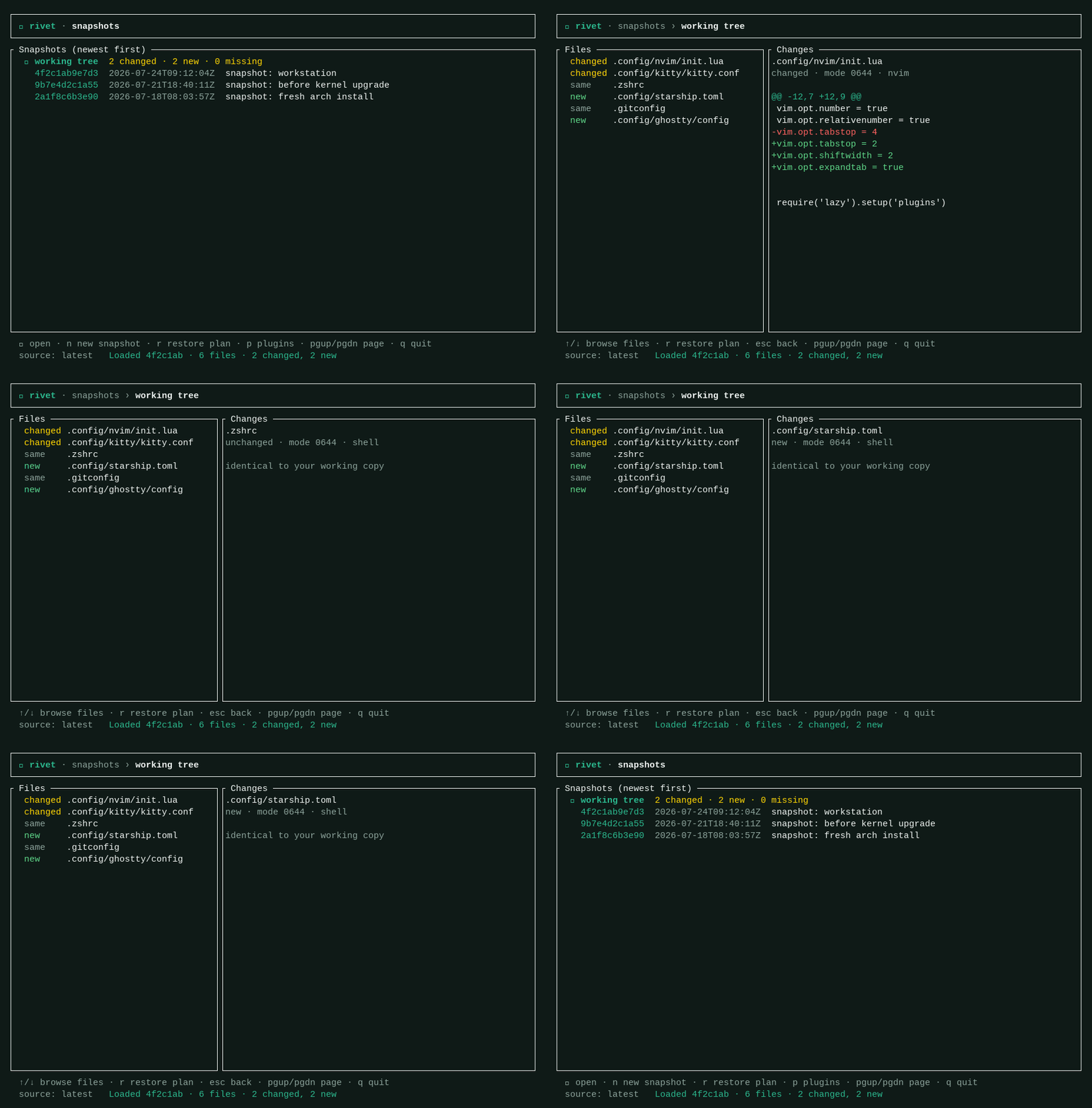
rivet tui puts working-tree drift, snapshot history, per-file diffs and the
restore plan on one screen. Every frame above is generated from the real
renderer by pressing the keys it shows. See
the terminal UI guide.
What Rivet captures
Section titled “What Rivet captures”| Packages | Native (Pacman/APT/DNF/Zypper/XBPS/Homebrew), foreign (AUR/MacPorts), Nix, Mac App Store, Flatpak, Snap, and AppImage — the ones you explicitly approve |
| Configuration | Curated groups for KDE Plasma, GNOME, Cinnamon, Xfce, Hyprland, Sway, niri, i3, shells, Git, Tmux, Kitty, VS Code, Vim/Neovim, fonts and themes — plus any path you rivet track yourself |
| Destinations | Git, a local/NAS path, an rclone remote, or restic — see where snapshots go |
| Never captured | Secrets, browser profiles, GnuPG, SSH keys, caches, Flatpak app data, system-wide configuration. On macOS also the Keychain, sandboxed app containers, cookies, and known session-token stores — the Keychain is never exported under any flag |
Secrets you do want carried go through an explicit
encrypted vault: rivet vault add ~/.ssh/config seals that
file into every snapshot with age, and the private identity never leaves the
machine.
Documentation
Section titled “Documentation”Everything is published at rivet.fobiat.workers.dev — searchable, with the CLI reference, JSON schemas, exclusion policy and threat model. The most common jumping-off points:
- Feature status — what works today, and the known limits
- Architecture — the crate layout and where to change things
- Cross-distro and macOS support — the support matrix
- Storage backends · Secrets vault · Tracking & plugins · Machine profiles
- Compatibility policy — what 1.0 freezes, and what may still move
- Verifying a release — checking signatures and provenance yourself
- JSON output — the supported schemas for scripting against Rivet
- Branding & assets — the palette, the logo files, and the shell prompt used in every rendered terminal
- Roadmap — what is scheduled next
docs/ in this repository is the source of truth; the site syncs from it at
build time and fails its build if a page goes missing. See
web/README.md to work on the site and
docs/DOCUMENTATION.md for the standard every page is
held to.
Build from source
Section titled “Build from source”To run Rivet from a branch instead of a tagged version, with Rust and Git available:
git clone https://github.com/fobiat/Rivet.gitcd Rivetcargo run -- scancargo testscan reports the detected distro family, native manager, window manager,
explicit packages, and supported configuration groups. The terminal UI is a
default-on Cargo feature; --no-default-features builds a headless CLI that
keeps every other command.
Contributing
Section titled “Contributing”Pull requests are welcome. CONTRIBUTING.md covers the build, the checks CI runs, the commit conventions, and the parts of the codebase that need extra care. This project follows the Contributor Covenant.
Found a security issue? Do not open a public issue — see SECURITY.md, which also states plainly what has and has not been reviewed.
License
Section titled “License”Dual-licensed under the Apache License 2.0 or the MIT license, at your option — the conventional Rust dual licence: MIT keeps reuse simple, Apache-2.0 adds an explicit patent grant.
Unless you explicitly state otherwise, any contribution intentionally submitted for inclusion in Rivet by you, as defined in the Apache-2.0 license, shall be dual-licensed as above, without any additional terms or conditions.